NEW POOL BADGE SYSTEM
Your board is excited to announce that our HOA is partnering with Innovative Aquatic Solutions for the2025 Pool Season to join the growing number of local communities implementing new CellBadge
technology for pool access. Everyone using our community’s pool facilities this season will need to pre-register.
This new process is entirely electronic and can be completed whenever you have a few moments! No
more badges to maintain/remember to bring to the pool!!
How to register:
1. Through the following website: cellbadge.com/collingtonhoa or the QR code to the right.
2. Go to ‘I Need to Register’ section. Click on the green ‘Registration’ button to begin the process.
3. Go to the ‘Not Approved Yet? You Need to Register’ section. Fill out the initial Add Request form
and click on ‘Request Access’.
4. Once your registration is verified, you will receive an e-mail message to complete your
registration. Your registration will remain pending until you complete the next step. Note:
Depending on the volume of requests received at the time of your registration, it could take a
few days to receive the e-mail message.
5. Follow the link in the e-mail or text and fill out the ‘Registered Previously or Approved’ section.
Enter your e-mail address or mobile/cell phone number and hit the ‘Request PIN’ button.
6. The PIN number will be sent via e-mail or text to your mobile/cell number. Enter the PIN
number on the CellBadge website. Caution: Depending on the speed of your connection, it may
take several seconds for the PIN to be delivered. Do not request a second PIN at this point as
this will delay your ability to complete the registration process. If you receive an ‘Invalid Recapt’
or ‘Are You a Robot’ banner after selecting the Request PIN button, then click through those
banners and select Request PIN again and your PIN will deliver.
7. Once you are into your account, complete your name and family information. Add every
member of your household that is living with you at your Collington address and upload
individual pictures of your household members (using the blue camera icon to the right of each
family member) and click on ‘Complete Registration’. Once approved, you will receive a second
confirmation e-mail/text stating that Registration is completed. DO NOT add anyone not living
in the home… they can come to the pool as a guest. Again, depending on the volume of requests
received at the time of your registration, it could take a few days to receive the final e-mail
confirmation message.
8. Pictures must be completed before you are able to swim. If you can’t or are unable to upload
pictures, the lifeguards will take your picture(s). The first time you go to the pool, bring a picture
ID with you (such as a Driver’s License). The lifeguards will look up your account, verify your
identity and take any picture(s) if necessary.
Additional Features/Instructions:
1. Nanny Passes will be available for $75 (same as last year). If you need a pool pass for your
nanny, include that individual as a member of your household in Step 7 above. Provide the
requested information (including a picture), and designate them accordingly. Then please send a
check for $75 to:
Collington
c/o ACS West, Inc.
1904 Byrd Ave Ste 100
Richmond, VA 23230
Please reference ‘Nanny Pass’ in the For/memo line on the check. If you have otherwise
completed the registration process, access will be approved for your family and then later for
the nanny once the check has been received/processed.
2. Homeowners leasing their property will need to sign a waiver relinquishing their rights to our
Collington HOA amenities to allow their tenants access to the pool (and courts). The waiver to
complete is available on our Collington HOA website and must be received before tenant access
will be approved/allowed. Any other arrangements are strictly between the landlord and tenant.
Once you have successfully completed all the necessary steps and received final approval, you can
download the CellBadge app from your App Store and will be able to access and manage your account as
well as receive other important information about pool status and activities.
CellBadge App
If you have any questions about the CellBadge process or need help setting up your account, there will
be three (3) Information/Sign-Up sessions at the Clubhouse:
o Wednesday, April 23 rd , from 6:00-8:00pm
o Sunday, April 27 th , from 2:00-4:00pm
o Tuesday, May 6 th , from 6:00-8:00pm
Do not show up at the pool and start the sign-up process expecting to be admitted into the pool area.
Since processing new applications can take several days, pool access will not be allowed until this
process is completed.
Check out our HOA website at collingtonhoa.com for additional information as well as the new Pool
Policies and Procedures for the pool that are in effect for the 2025 season.
Don’t delay what you can start working on today!
Also Coming in the Future:
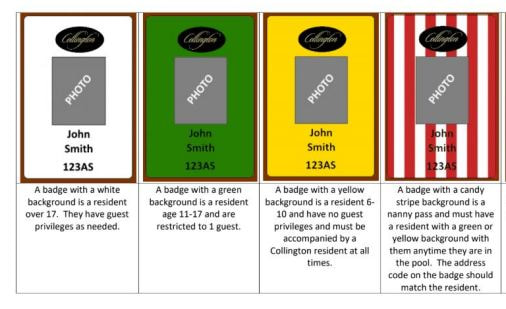
CellBadge access for the Courts Complex! In the meantime, please do not dispose of your current
badges as they will still be needed to access the courts.
You will receive another communication from the board prior to any implementation providing
additional processes and procedures for obtaining access to the tennis, pickleball and basketball courts.
technology for pool access. Everyone using our community’s pool facilities this season will need to pre-register.
This new process is entirely electronic and can be completed whenever you have a few moments! No
more badges to maintain/remember to bring to the pool!!
How to register:
1. Through the following website: cellbadge.com/collingtonhoa or the QR code to the right.
2. Go to ‘I Need to Register’ section. Click on the green ‘Registration’ button to begin the process.
3. Go to the ‘Not Approved Yet? You Need to Register’ section. Fill out the initial Add Request form
and click on ‘Request Access’.
4. Once your registration is verified, you will receive an e-mail message to complete your
registration. Your registration will remain pending until you complete the next step. Note:
Depending on the volume of requests received at the time of your registration, it could take a
few days to receive the e-mail message.
5. Follow the link in the e-mail or text and fill out the ‘Registered Previously or Approved’ section.
Enter your e-mail address or mobile/cell phone number and hit the ‘Request PIN’ button.
6. The PIN number will be sent via e-mail or text to your mobile/cell number. Enter the PIN
number on the CellBadge website. Caution: Depending on the speed of your connection, it may
take several seconds for the PIN to be delivered. Do not request a second PIN at this point as
this will delay your ability to complete the registration process. If you receive an ‘Invalid Recapt’
or ‘Are You a Robot’ banner after selecting the Request PIN button, then click through those
banners and select Request PIN again and your PIN will deliver.
7. Once you are into your account, complete your name and family information. Add every
member of your household that is living with you at your Collington address and upload
individual pictures of your household members (using the blue camera icon to the right of each
family member) and click on ‘Complete Registration’. Once approved, you will receive a second
confirmation e-mail/text stating that Registration is completed. DO NOT add anyone not living
in the home… they can come to the pool as a guest. Again, depending on the volume of requests
received at the time of your registration, it could take a few days to receive the final e-mail
confirmation message.
8. Pictures must be completed before you are able to swim. If you can’t or are unable to upload
pictures, the lifeguards will take your picture(s). The first time you go to the pool, bring a picture
ID with you (such as a Driver’s License). The lifeguards will look up your account, verify your
identity and take any picture(s) if necessary.
Additional Features/Instructions:
1. Nanny Passes will be available for $75 (same as last year). If you need a pool pass for your
nanny, include that individual as a member of your household in Step 7 above. Provide the
requested information (including a picture), and designate them accordingly. Then please send a
check for $75 to:
Collington
c/o ACS West, Inc.
1904 Byrd Ave Ste 100
Richmond, VA 23230
Please reference ‘Nanny Pass’ in the For/memo line on the check. If you have otherwise
completed the registration process, access will be approved for your family and then later for
the nanny once the check has been received/processed.
2. Homeowners leasing their property will need to sign a waiver relinquishing their rights to our
Collington HOA amenities to allow their tenants access to the pool (and courts). The waiver to
complete is available on our Collington HOA website and must be received before tenant access
will be approved/allowed. Any other arrangements are strictly between the landlord and tenant.
Once you have successfully completed all the necessary steps and received final approval, you can
download the CellBadge app from your App Store and will be able to access and manage your account as
well as receive other important information about pool status and activities.
CellBadge App
If you have any questions about the CellBadge process or need help setting up your account, there will
be three (3) Information/Sign-Up sessions at the Clubhouse:
o Wednesday, April 23 rd , from 6:00-8:00pm
o Sunday, April 27 th , from 2:00-4:00pm
o Tuesday, May 6 th , from 6:00-8:00pm
Do not show up at the pool and start the sign-up process expecting to be admitted into the pool area.
Since processing new applications can take several days, pool access will not be allowed until this
process is completed.
Check out our HOA website at collingtonhoa.com for additional information as well as the new Pool
Policies and Procedures for the pool that are in effect for the 2025 season.
Don’t delay what you can start working on today!
Also Coming in the Future:
CellBadge access for the Courts Complex! In the meantime, please do not dispose of your current
badges as they will still be needed to access the courts.
You will receive another communication from the board prior to any implementation providing
additional processes and procedures for obtaining access to the tennis, pickleball and basketball courts.
Scan the below QR code with your cell phone to open registration or click on the button below that says Register for Cellbadge
| |||||||||||||
| |||||||
Collington Residents ONLY. Apply below for a badge to access the courts.